The Complete M365 Employee Offboarding Checklist
When Was the Last Time Someone Left Your Company?
Think back to the last person who left your organization. What happened to their email? Their OneDrive? Their Teams channels? If you’re not sure, that’s the problem.
Most SMBs don’t have a formal offboarding process. IT gets a Slack message or a forwarded email that says “John left last Friday” and then scrambles to figure out what to do. Meanwhile, the departing employee’s account is still active, their mailbox is still receiving client correspondence, and their OneDrive still has every proposal, contract, and spreadsheet they touched in the last three years.
At ITechPlus, we’ve standardized this into a repeatable process that we run for every managed IT client. We’ve refined it across hundreds of departures. Here’s the public version.
Why Employee Offboarding Is a Security Event
I want to be direct about this: an active account for a terminated employee is a security incident, not an oversight. It’s not an administrative task you’ll get to next week. It’s a gap in your security posture that needs to be closed within hours, not days.
Here’s why this matters more than most IT teams realize:
The OneDrive 30-day trap. The moment you remove a user’s M365 license, a 30-day countdown begins on their OneDrive. After 30 days, everything in that OneDrive is permanently deleted. If you didn’t copy the files first, they’re gone. I’ve seen companies lose entire project archives because someone in IT removed a license on a Friday afternoon without thinking about it.
License cost surprises. Converting a mailbox to shared is free as long as it stays under 50GB. The moment it exceeds 50GB, you need a license assigned to it again. If you’re not monitoring this, you’re either paying for licenses you don’t need or you’re out of compliance with Microsoft’s licensing terms.
Compliance exposure. If you’re in healthcare, legal, or finance, you have regulatory obligations around data retention. HIPAA requires six years. SOX and IRS requirements push to seven. A sloppy offboarding process can put you on the wrong side of an audit.
OAuth persistence. This is the one that keeps me up at night. We recently ran a forensic audit for a client and found an OAuth token that had been granting full mailbox access for 46 months — and it survived a password reset. The employee had been gone for nearly four years, and a third-party app still had read/write access to their shared mailbox. Blocking sign-in doesn’t revoke OAuth consents. You have to do that separately.
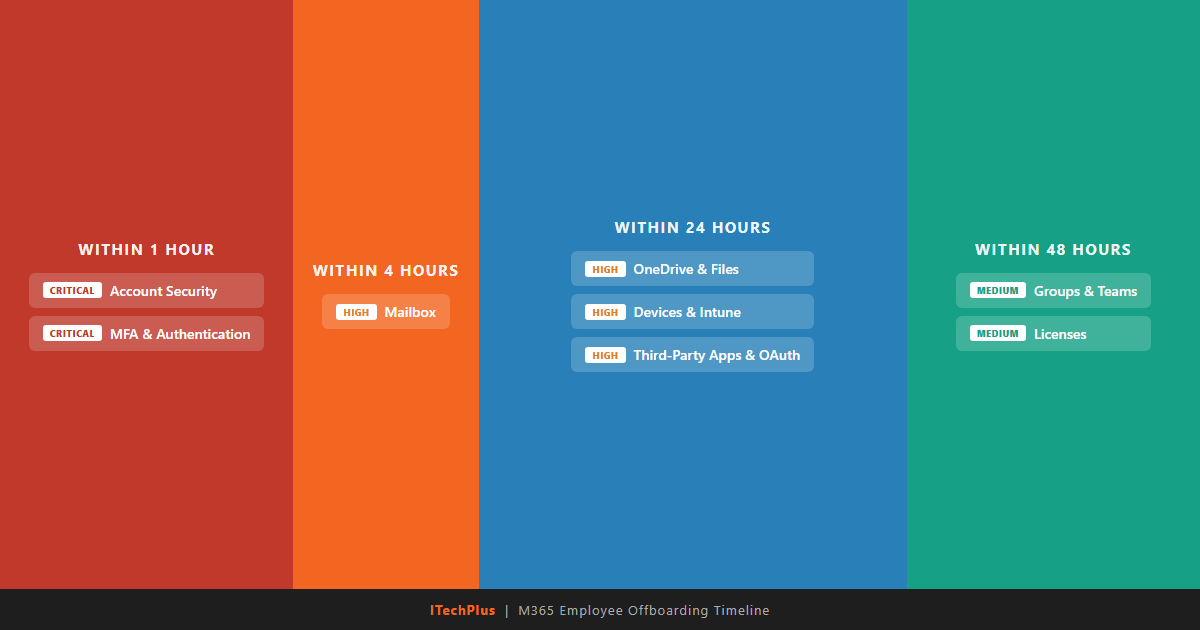
The offboarding timeline: what needs to happen and when
The M365 Employee Departure Checklist: 8 Categories, 35+ Steps
Our full checklist covers 35+ individual actions across eight categories. Below is a summary of each category and why it matters. For the complete printable version with every step, download the full checklist PDF.
1. Account Security (Critical — Within 1 Hour)
Block sign-in, revoke all active sessions, reset the password, and remove MFA methods. This is the first thing you do, before anything else. Every minute the account stays active is a minute of unnecessary exposure. We’ve seen terminated employees log into their accounts after hours to download client lists. Don’t give them the chance.
2. Mailbox (High — Within 4 Hours)
Convert the mailbox to a shared mailbox, grant appropriate access to the employee’s manager, set up an out-of-office auto-reply, and hide the address from the Global Address List. The order of operations here is critical.
3. OneDrive & Files (High — Within 24 Hours)
Grant the departing employee’s manager access to their OneDrive, then copy all relevant files to a shared location (SharePoint or a team drive). This is where institutional knowledge lives — proposals, templates, client notes, project files. Once the license is removed, the 30-day auto-deletion countdown starts and there’s no pause button.
4. Licenses (Medium — After Data Is Preserved)
Confirm that all mailbox conversions are complete and all OneDrive data has been copied. Then remove the assigned licenses and document what was removed. Most companies are paying for 10-15% more licenses than they need because nobody tracks this during offboarding. Over a year, that adds up to thousands of dollars in wasted spend.
5. Groups, Teams & Distribution Lists (Medium — Within 48 Hours)
Remove the user from all Microsoft 365 Groups, Teams, and distribution lists. Transfer ownership of any Teams or Groups they owned. A Team with no owner becomes orphaned — nobody can manage membership, change settings, or add new channels. If you don’t catch this during offboarding, you’ll discover it six months later when someone needs to add a new team member and can’t.
6. Devices & Intune (High — Within 24 Hours)
Perform a selective wipe (or full wipe if the device is company-owned), remove the device from Intune enrollment, and rotate the BitLocker recovery keys. A laptop with cached credentials is a breach waiting to happen. If the employee had a personal device enrolled in your MDM, you need to remove corporate data without wiping their personal files.
7. MFA & Authentication (Critical — Within 1 Hour)
Remove all registered authentication methods — authenticator apps, phone numbers, FIDO2 keys, app passwords. Remove the user from any Conditional Access exclusion groups. Blocking sign-in isn’t enough — cached tokens persist, and if you’ve excluded the user from certain CA policies for troubleshooting, those exclusions need to be cleaned up.
8. Third-Party Apps & OAuth (High — Within 24 Hours)
Revoke all OAuth application consents, remove access from SaaS platforms (Salesforce, HubSpot, Slack, etc.), and disable SSO sessions. This is the one most IT teams skip entirely. OAuth consents survive password resets. They survive sign-in blocks. The only way to stop them is to explicitly revoke them in the Entra admin portal under the user’s application consents.
Get the Complete Checklist
Download the full 35-step printable PDF with all 8 categories, data retention table, and compliance guide.
The 3 Offboarding Mistakes We See Most Often
After running hundreds of offboarding processes for our managed IT clients, these are the three mistakes that cause the most damage. If you’re building your own process, avoid these at all costs.
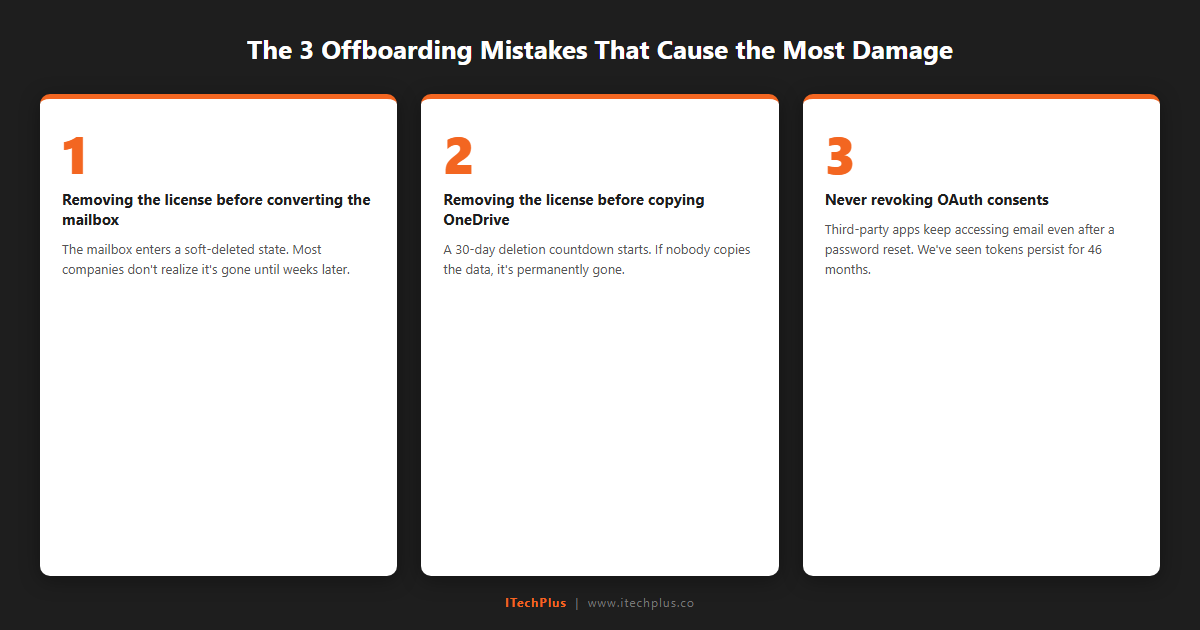
The three offboarding mistakes that cause the most damage
Mistake 1: Removing the license before converting the mailbox. This is the most common and most painful. When you remove the M365 license from a user, their mailbox goes with it. If you haven’t converted it to a shared mailbox first, you have a 30-day recovery window through Microsoft support — but it’s not guaranteed, and it’s always stressful. I’ve watched IT teams spend days trying to recover a mailbox that could have been preserved with a single PowerShell command run in the right order.
Mistake 2: Removing the license before copying OneDrive data. Same trigger, different consequence. License removal starts a 30-day auto-deletion countdown on the user’s OneDrive. We typically see 5-15GB of critical files per departing employee — proposals, contracts, project plans, client deliverables. Once that 30-day window closes, the data is unrecoverable. Copy first. Always.
Mistake 3: Never revoking OAuth consents. This is the silent one. The employee leaves, IT blocks sign-in and resets the password, and everyone assumes the job is done. But OAuth tokens granted to third-party apps keep working. They don’t care about password resets. They don’t care about sign-in blocks. That forensic audit I mentioned earlier — the one where we found a 46-month-old OAuth token — that’s not unusual. We find stale OAuth consents in almost every tenant we audit.
Data Retention: What to Keep and for How Long
One of the hardest parts of offboarding is knowing what to keep and for how long. Delete too early and you risk a compliance violation. Keep everything forever and you’re paying for storage and licenses you don’t need. Here’s our baseline recommendation:
| Data Type | Minimum Retention | Cost / Notes |
|---|---|---|
| Shared Mailbox | 1 year | No cost if under 50GB |
| OneDrive Files | Copy immediately | Auto-deletes 30 days after license removal |
| Litigation Hold | Until legal releases | Requires Exchange Online Plan 2 license |
| HIPAA Data | 6 years | Use retention labels in Microsoft Purview |
| Financial Records | 7 years | SOX / IRS requirements |
| Audit Logs | Export before expiry | 90 days standard / 1 year with E5 |
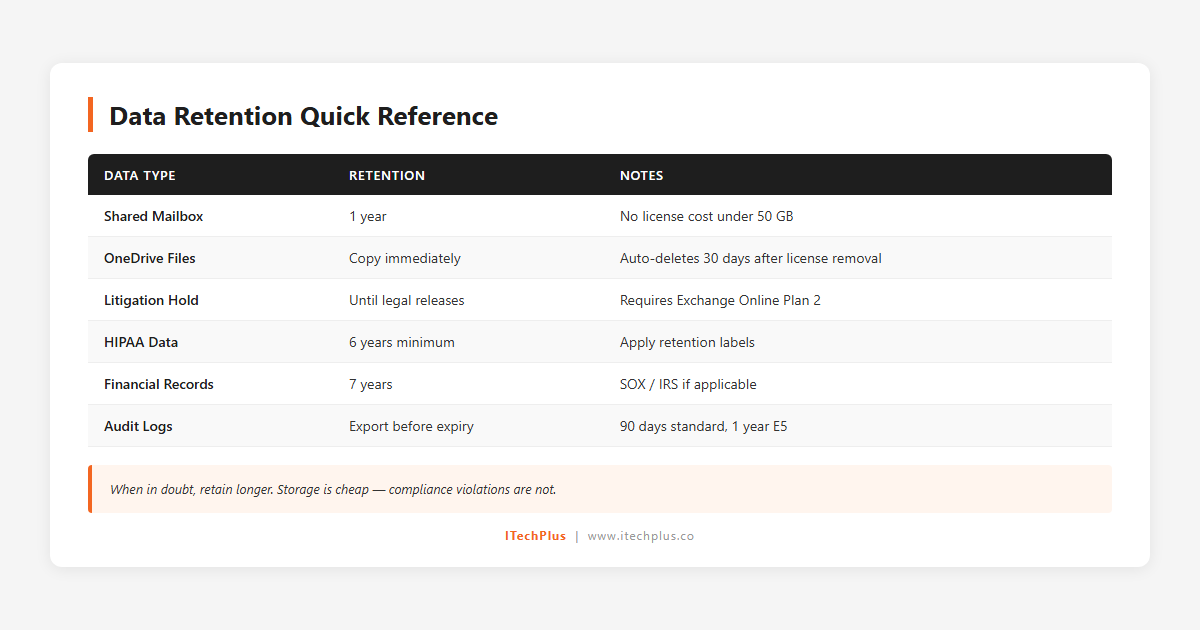
Data retention quick reference — print this for your compliance files
When in doubt, retain longer. The cost of keeping a shared mailbox for an extra year is negligible. The cost of not having data when a regulator or attorney asks for it is not.
Build This Into Your IT Operations
A checklist only works if it gets used. The best offboarding processes are the ones that are triggered automatically — by an HR system, a ticket, or a documented workflow that starts the moment a departure is confirmed.
If you’re building this yourself, use our checklist as a starting point. If you’d rather not think about it at all, that’s what managed IT is for.
Download the full checklist: M365 Employee Offboarding Checklist (PDF) — 35+ steps, printable, ready to hand to your IT team.
Not sure where your gaps are? Request a free IT assessment and we’ll audit your current offboarding process along with the rest of your environment.
Want us to handle this for you? That’s what managed IT is for.
— Ric Acevedo, CEO, ITechPlus