The OAuth Token That Survived a Password Reset for 46 Months
If someone told you that changing your Microsoft 365 password does not revoke access to your email, most business owners would not believe it. We did not expect to find it either — until a forensic audit revealed that a third-party app had been reading, sending, and deleting emails in a client mailbox for 46 months. The password had been changed. It did not matter.
Here is exactly what we found, why it happened, and what every Central Florida business running Microsoft 365 needs to check today.
A Password Reset Does Not Revoke OAuth Access
A client called us about suspicious activity in an employee’s Microsoft 365 mailbox. The password had already been changed. They assumed the problem was handled.
It was not.
When we ran a two-phase forensic audit — Graph API deep scan followed by Exchange Online forensics — we found an OAuth application consent that had been granting complete mailbox access since May 2022. Read everything. Send as the user. Delete messages. All of it. And the password reset had not touched it.
What Is an OAuth Consent and Why Should You Care
OAuth is the standard that lets third-party apps connect to your Microsoft 365 account without needing your password. Microsoft’s official documentation on refresh tokens confirms that these tokens persist independently of user credentials. When you click Allow to connect an app — like your iPhone native Mail app, a calendar sync tool, or a file sharing service — you are granting that app a token that authorizes it to act on your behalf.
Some of those tokens are short-lived. Others are not. The specific token type involved in this case was a refresh token with offline_access scope. That means it does not expire when your session ends. It persists. The app can use it to request new access tokens indefinitely — until an admin explicitly revokes the consent.
Changing your Microsoft 365 password does nothing to an active OAuth refresh token. It is a completely separate authorization pathway that requires an admin to explicitly revoke the consent from Entra ID.
What We Found in Under 2 Hours
When we pulled the OAuth consents via Graph API for the mailbox in question, we found three app grants. One stood out immediately. The scopes were EWS.AccessAsUser.All, EAS.AccessAsUser.All, and offline_access.
That combination means full Exchange Web Services access plus ActiveSync access, with a persistent refresh token. In plain terms: complete read, write, send, and delete access to the mailbox — with no expiration. The consent was tied to an iPhone using the native iOS Mail app, not Outlook. The device had been registered in 2022. Based on the consent start date, the access window was potentially 46 months.
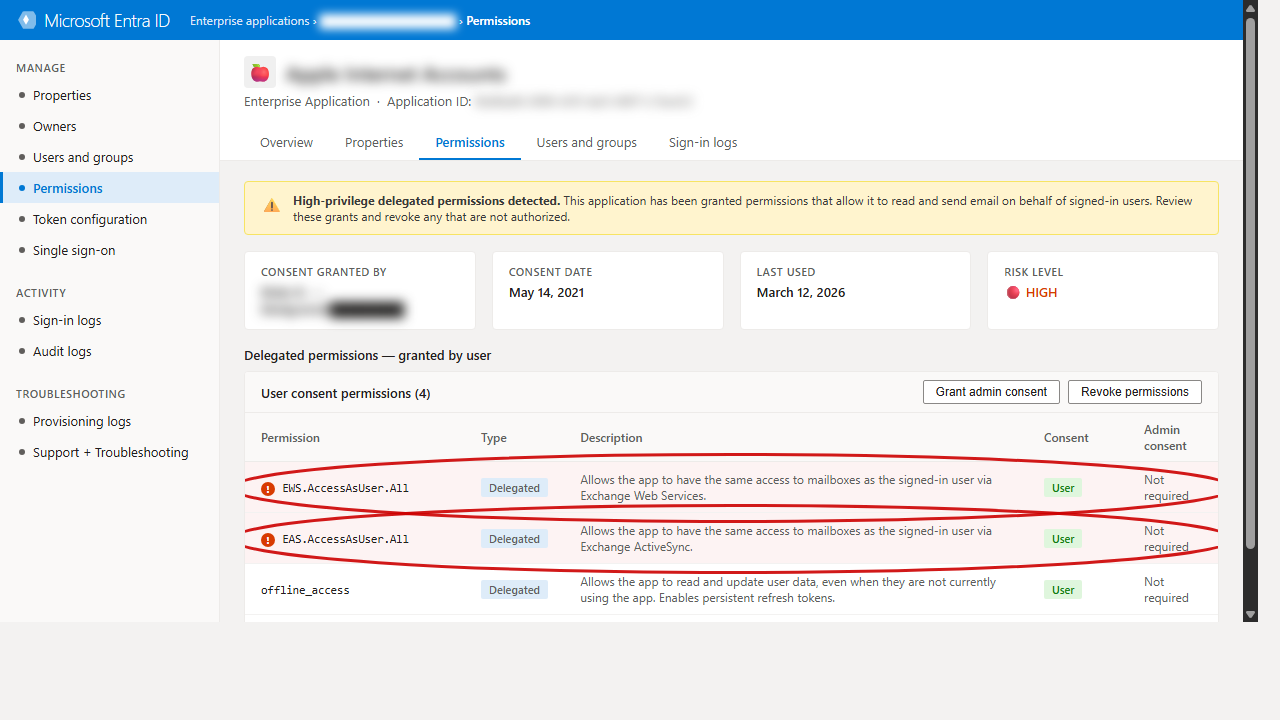
Microsoft Entra ID flagging high-privilege OAuth grants — consent granted May 2022, still active as of March 2026.
We also found:
- 17 inbox rules — all legitimate personal organization rules, nothing malicious
- No forwarding rules, no delegate access
- 10 registered mobile devices, 6 of them stale with no activity in over a year
- Zero unified audit log records for the past 90 days — audit logging had never been properly configured
That last finding matters. The empty audit log does not mean nothing happened. It means we cannot prove what happened. That is a significant distinction in an incident response context.
Why Most Businesses Miss This
Your M365 admin portal shows you a lot of things. OAuth consents are not front and center. Most small and mid-size businesses never look at them. Even IT providers who do routine maintenance often skip this check because there is no obvious alert telling you that an app has been holding onto full mailbox access for four years.
The controls exist. Microsoft gives you the ability to require admin approval for high-privilege OAuth scopes, configure tenant-wide consent policies, and review all active grants. Most tenants have never turned any of this on.
Add in the fact that many smaller businesses lack Entra ID P1 licensing — which means no sign-in logs — and you have a visibility gap that an attacker, or a persistent token, can sit inside undetected for years. This is especially critical for businesses in regulated industries like healthcare or legal, where unauthorized email access carries serious compliance consequences.
What to Do Right Now
For this client, the immediate remediation steps were: revoke the OAuth consent, invalidate all active sessions, enforce MFA, clean up stale device registrations, enable litigation hold to preserve evidence, and configure mailbox audit actions going forward.
The longer-term hardening included enabling admin consent requirements for high-privilege scopes, upgrading to Entra ID P1 for sign-in log visibility, and implementing a quarterly OAuth consent review.
For your business — regardless of whether you have had an incident — here is the minimum you should be doing today:
- Go to Entra ID > Enterprise Applications and review all OAuth consents your users have granted
- Filter for high-privilege scopes:
EWS.AccessAsUser.All,Mail.ReadWrite,offline_access - Revoke any consents tied to apps your team no longer actively uses
- Configure your tenant to require admin approval for future high-privilege consents
- Enable unified audit logging if it is not already active
Not sure where your business stands? Take our free Business IT Assessment to identify your biggest gaps in under five minutes.
Get a Free Microsoft 365 Security Audit
If you are a business in the Davenport, Kissimmee, or Central Florida area running Microsoft 365, we offer complimentary forensic audits for qualifying businesses. We use the same two-phase process — Graph API scan plus Exchange Online forensics — and deliver a full findings report with specific remediation steps.
Request your free Microsoft 365 security audit here.